Voice interaction architecture
Voice interaction processing
Generally, to implement voice interaction, like as below.
1. Capture the user's voice and convert the sound into text
2. Select or create a response based on the text recognized in step 1.
3. Convert the response from step 2 into speech and play it back.
ACUAH allows you to configure this sequence using one of the following three interaction methods.
- Scenario (Dialogue scenario)
- LLM
- LLM Function calling
Each interaction method is described later. In ACUAH, the interaction method determines differences in voice interaction, function execution, learning, and changes in affection/emotion values.
| Conversation type | Voice interaction | Response voice (Recorded) | Response voice (Synthesis) | Function execution | Learning | Affection/Emotion Value Change |
|---|---|---|---|---|---|---|
| Scenario | ? | ✔ | ✔ | ✔ | ✔ | |
| LLM | ✔ | ✔ | ||||
| LLM Function calling | ✔ | ✔ | ✔ | ✔ | ✔ |
✔: Possible/Available ?: Possible/Available (with restrictions) (Blank): Not possible/Not available
Please select and configure the conversation type based on your desired voice interaction experience with your own character.
- If you want to enjoy recorded audio or have the function execute precisely, but there are restrictions on what you can say, please choose "Scenario"
- If you want to enjoy AI-powered voice interaction only, please choose "LLM"
- If you want to utilize the strengths of AI while also having functions executed, please choose "LLM Function calling"
About voice recognition
- ACUAH utilizes the device-local voice recognition engine standardly equipped in smartphone OS (Android, iOS).
- ACUAH's voice recognition engine depends on the smartphone OS's system language setting.
- If using the "LLM" or "LLM Function calling" as the conversation type, you need an API key for Microsoft Azure AI Speech. For details, see About the Voice API.
Scenario (Dialogue scenario)
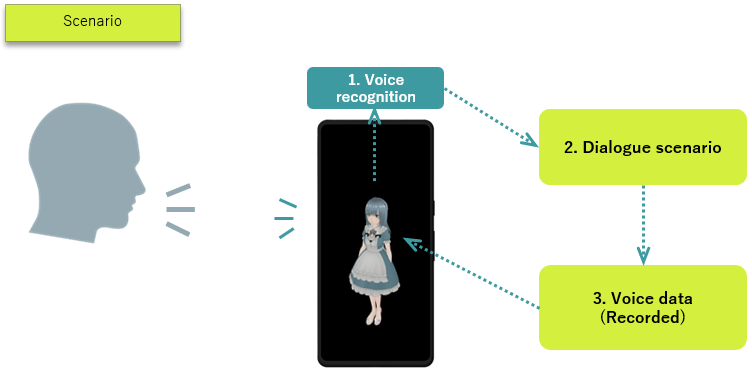
- A dialogue scenario is like a table listing strings and their corresponding response content.
(Example)
| String | Response (Action) |
|---|---|
| Hello | Wave hand and play "Hi." audio |
| Hi | Wave hand and play "Hello." audio |
| Good morning | Wave hand and play "Good morning" audio |
| ... | ... |
This is the traditional "rule-based" processing.
- When a user speaks to ACUAH, the smartphone's speech recognition engine converts the user's voice (sound) into text.
- The converted text is checked against the dialogue scenario (table).
- Audio data is played according to the response (action). (If no matching text exists in the dialogue scenario, it responds with "I don't understand.")
The lack of a matching string results in the blunt response "I don't understand", which is a challenge for voice interaction by dialogue scenario. However, it has the greatest advantage which is it can accurately perform a specific action for a specific string.
LLM
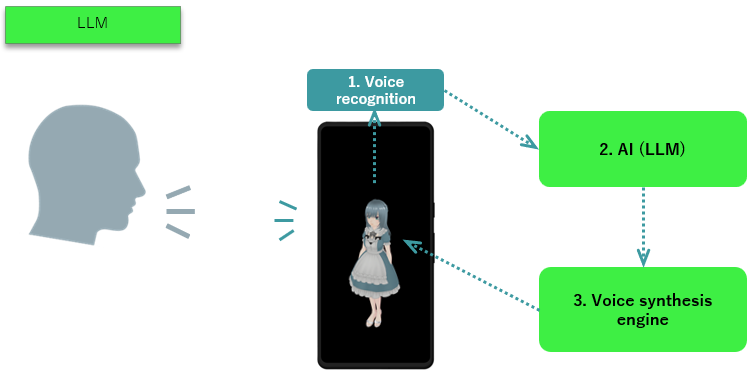
- LLM refers to Large Language Model in modern AI technology. When given any text input, they generate a response as if human, providing an answer. Representative LLMs include the following:
- ChatGPT, Gemini, Claude, Llama, Grok
- A text-to-speech engine is a mechanism that converts text strings into speech (a human voice). Representative text-to-speech engines include the following:
- VOICEVOX (Japanese only), Google Cloud Text-to-Speech, Microsoft Azure AI Speech
- The smartphone's speech recognition engine converts the user's voice (sound) into a text string.
- The converted text is input into the AI(LLM).
- The text output by the AI(LLM) is processed by the text-to-speech engine and played back as audio.
While this mechanism enables the system to provide some response to the user's voice (various text inputs), a key challenge is that the AI's response may sometimes be incorrect.
LLM Function calling
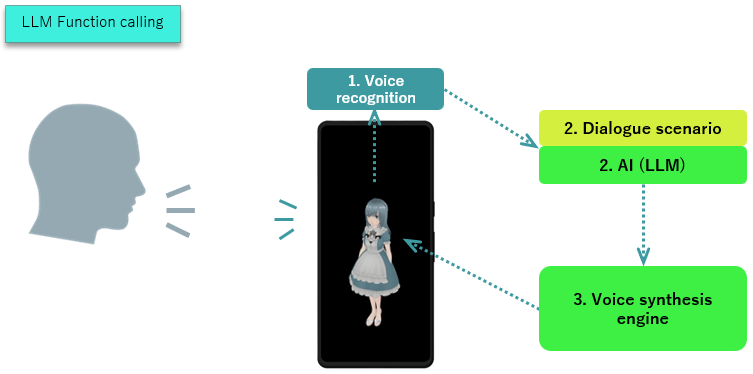
- LLM Function calling refers to a scenario where the AI's response includes the execution of a function.
- The AI(LLM) generates a response that contains not only text but also information about which function to execute.
- The smartphone's voice recognition engine converts the user's voice (sound) into text.
- The converted text is input into the dialogue scenario and the AI(LLM).
- The output includes the text containing the function to execute from step 2. Simultaneously, the response audio is processed by the text-to-speech engine and played back.
(Example)
User: "Wake me up tomorrow at 8:15 a.m."
AI (LLM): "Got it."
AI (LLM): "Execute the SetAlarmClock program. Set the time to 8:15 a.m." → The alarm is set for 8:15 a.m.
While this mechanism allows executing functions while conversing with a character, a challenge is that the AI's response may sometimes be incorrect, meaning there is a possibility of executing the wrong function.
At ACUAH, LLM Function calling is processed using a hybrid mechanism combined with dialogue scenarios.